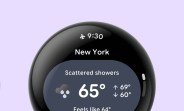
Google is quietly testing a feature that could change how you glance at your smartwatch. The company has introduced a status bar for Wear OS, similar to what you see on Android phones, and it’s now available in a test version for developers to try out. The feature appeared in the Wear OS 7.1 canary emulator, and Google is actively asking developers to test it and share their feedback. This is a small addition, but it could have a big impact on how you interact with your watch throughout the day.
What Exactly Is Google Testing?
At its core, the experiment adds a thin status bar at the top of the Wear OS screen. This bar displays the current time and the most important status indicator at any given moment. If there are multiple indicators—like a low battery warning, a notification alert, or a connectivity issue—only the one with the highest priority is shown. The idea is to give you quick access to essential information without cluttering the small screen.
The status bar is not yet available in the stable version of Wear OS. It’s currently limited to the canary emulator, which is a pre-release version of the operating system meant for developers. Google is using this early build to gather feedback and iron out any issues before rolling it out to the public. The company has a history of testing features in canary channels before they reach mainstream devices, so this is a typical step in the development process.
Why a Status Bar on a Smartwatch?
Screen real estate on a smartwatch is extremely limited. Every pixel counts, and adding a status bar might seem counterintuitive because it takes up valuable space. However, Google’s approach is to make that space work harder for you. By showing only the most critical information, the status bar aims to reduce the need to swipe or navigate through menus just to check the time or see if you have a notification.
On Android phones, the status bar is a familiar element that provides constant access to time, battery, and notifications. Bringing a similar concept to Wear OS could make the platform feel more consistent and intuitive, especially for users who are already accustomed to Android’s design language. It also aligns with Google’s broader efforts to unify its ecosystem and make transitions between devices smoother.
The Challenge of Prioritization
One of the most interesting aspects of this experiment is how it handles multiple status indicators. Instead of showing all of them at once, the system picks the top priority one. This means if your watch is running low on battery and you also have an unread message, the battery warning might take precedence. The exact hierarchy is not yet clear, but it’s likely based on urgency and importance. For example, a critical battery level would probably outrank a social media notification.
This prioritization is crucial because showing too many icons would defeat the purpose of a clean, glanceable interface. It also prevents information overload, which is a common problem on small screens. By focusing on one indicator at a time, the status bar ensures that you see what matters most without being distracted by less important details.
How Will This Affect Developers?
For developers, the introduction of a status bar means they need to consider how their apps will interact with this new element. Apps that display their own status indicators or use the top of the screen for content might need to adjust their layouts to avoid overlap. Google is likely to provide guidelines and APIs to help developers integrate with the status bar seamlessly.
The canary emulator release is a signal that Google wants developer feedback early. Developers can test their apps with the status bar enabled and see how it behaves in different scenarios. This collaborative approach helps Google refine the feature before it reaches consumers, reducing the risk of bugs or usability issues. It also gives developers time to update their apps so that everything works smoothly when the feature goes live.
Potential Use Cases
Imagine you’re in a meeting and your watch vibrates. With a status bar, you can glance at your wrist and see the time and a notification icon without having to wake the full screen or navigate through menus. Or perhaps you’re on a run and your watch alerts you to a low battery—the status bar would show that warning prominently, so you know to head back home. These small conveniences add up to a more polished and user-friendly experience.
The status bar could also be useful for apps that run in the background, like fitness trackers or music players. They could potentially use the status bar to show a persistent icon indicating that they are active, similar to how Android shows icons for ongoing processes. This would give users a quick way to see what’s running without opening the app.
What’s Next for Wear OS?
This status bar experiment is part of a larger effort by Google to improve Wear OS. In recent years, the platform has seen significant updates, including better battery life, improved performance, and a redesigned user interface. Google has also been working closely with manufacturers like Samsung and Fossil to bring new features and devices to the market.
The status bar is a relatively small change, but it reflects Google’s attention to detail and its willingness to iterate on the user experience. If the feedback from developers is positive, we could see the status bar roll out to all Wear OS devices in a future update. However, Google has not announced a timeline, so it’s unclear when or if this feature will become widely available.
For now, the experiment is limited to the canary emulator, which means only developers and enthusiasts who are comfortable with early software can try it. But it’s a promising sign that Google is continuing to invest in Wear OS and looking for ways to make smartwatches more useful and intuitive.
How Does It Compare to Other Smartwatch Platforms?
Apple’s watchOS has long had a status bar-like element at the top of the screen, showing the time and a few icons. Samsung’s Tizen and the newer One UI Watch also incorporate similar elements. Google’s move brings Wear OS more in line with these competitors, offering a familiar and efficient way to display information. It also addresses a common complaint among Wear OS users: the lack of quick access to basic information without navigating through menus.
However, Google’s approach of showing only the top priority indicator is slightly different from other platforms, which often display multiple icons. This could be a deliberate choice to keep the interface clean and focused, but it might also mean that some information is hidden until you take action. The success of this feature will depend on how well the prioritization logic works and whether users find it helpful or frustrating.
The Importance of Developer Feedback
Google’s request for developer feedback is a crucial part of the process. Developers are the ones who build the apps that run on Wear OS, and their input can shape the feature to better meet real-world needs. By testing the status bar in the canary emulator, developers can identify issues like layout conflicts, performance problems, or missing functionality. Google can then address these issues before the feature is released to the public.
This collaborative approach is common in the Android ecosystem, where Google frequently releases preview versions of new features to gather feedback. It helps ensure that the final product is polished and meets the expectations of both users and developers. For Wear OS, which has a smaller app ecosystem compared to Android on phones, getting developer buy-in is especially important.
What Developers Should Do
If you’re a developer working on Wear OS apps, now is the time to start experimenting with the status bar. You can download the canary emulator and test your app to see how it interacts with the new element. Check for any UI elements that might be obscured by the status bar and adjust your layouts accordingly. Also, consider whether your app could benefit from using the status bar to display its own status indicators.
Google is likely to provide documentation and guidelines for the status bar as the feature matures. Keep an eye on the Wear OS developer blog and documentation for updates. Providing feedback to Google during this early phase can help shape the future of the platform and ensure that your app is ready when the feature goes live.
Will This Feature Reach Consumers?
It’s too early to say for sure, but the fact that Google is testing the status bar in a canary emulator suggests that it’s seriously considering adding it to Wear OS. The company often uses canary channels to test features that eventually make it to stable releases. However, some experiments never see the light of day, so there’s no guarantee.
If the feature does roll out, it will likely be part of a future Wear OS update, such as Wear OS 4 or later. Google typically announces major updates at its annual developer conferences, so we might hear more at Google I/O or a similar event. For now, Wear OS users can only wait and hope that this small but useful change becomes a reality.
Conclusion
Google’s status bar experiment for Wear OS is a subtle but potentially impactful change. By providing quick access to the time and priority status indicators, it aims to make smartwatches more glanceable and efficient. The feature is still in testing, and its future depends on developer feedback and Google’s assessment of its value. If it succeeds, it could become a standard part of Wear OS, improving the overall user experience for millions of smartwatch users.
As wearable technology continues to evolve, small improvements like this can make a big difference. They show that Google is listening to users and striving to make Wear OS competitive with other platforms. Whether you’re a developer or a casual user, it’s worth keeping an eye on this experiment—it might just change the way you use your smartwatch.