
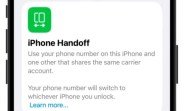
Apple is gearing up to unveil iOS 27 to the public, likely right after its much-anticipated iPhone event next week. While the update is packed with expected enhancements, one feature has quietly stolen the spotlight: the ability to use a single phone number across two iPhones. Dubbed iPhone Handoff, this capability was briefly teased on a slide during Apple’s Worldwide Developers Conference (WWDC) in June. Now, thanks to a sharp-eyed MacRumors forum member, we have a clearer picture of how this feature will actually work in practice.
What is iPhone Handoff?
iPhone Handoff is a new iOS 27 feature designed to bridge the gap between multiple iPhones owned by the same person. In essence, it allows you to link two iPhones to the same phone number, so calls, messages, and even FaceTime can be routed to both devices simultaneously. This is a game-changer for users who juggle a personal and work iPhone, or those who want a seamless experience when upgrading to a new device without immediately parting with the old one.
Unlike traditional SIM swapping or dual-SIM setups, iPhone Handoff leverages Apple’s cloud infrastructure to synchronize your phone number across devices. This means you don’t need to physically move a SIM card or rely on carrier support for eSIM cloning. Instead, the feature works at the software level, making it far more flexible and user-friendly.
How It Differs from Existing Features
Apple already offers Continuity features like Calls on Other Devices and Text Message Forwarding, but these require a primary device to relay information. iPhone Handoff is fundamentally different: it treats both iPhones as equals. Each device can independently make and receive calls, send texts, and use FaceTime, all under the same number. This eliminates the need for a ‘primary’ device, which is a significant shift in how Apple handles multi-device communication.
First Look: How iPhone Handoff Works
The initial details come from a MacRumors forum member who simulated two iPhones using Device Hub in Xcode 27, Apple’s development environment. By setting up the iPhone Handoff feature in the simulator, they were able to replicate the user experience and uncover the underlying mechanics. Here’s what they found:
Setup Process
To enable iPhone Handoff, you’ll need to navigate to Settings > Phone > iPhone Handoff on both devices. The setup process requires you to sign in with the same Apple ID on both iPhones. Once signed in, you’ll be prompted to verify your phone number via a one-time code sent to each device. After verification, both iPhones will display a confirmation that they are linked to the same number.
The feature also integrates with iCloud, so your call history, voicemail, and message threads sync across both devices in real time. This means you can start a conversation on one iPhone and pick it up on the other without missing a beat.
Call and Message Handling
When a call comes in, both iPhones will ring simultaneously. You can answer on either device, and the other will automatically stop ringing. Similarly, if you’re on a call and pick up the second iPhone, you can seamlessly hand off the call by tapping a notification that appears on the second device. This is particularly useful if one iPhone is running low on battery or if you need to switch to a device with a better camera for a video call.
For messages, iMessage and SMS texts sent to your number will appear on both devices. You can reply from either, and the conversation stays in sync. If you delete a message on one iPhone, it will also disappear on the other, thanks to iCloud sync.
FaceTime Integration
FaceTime calls are also fully integrated. Incoming FaceTime calls will ring on both devices, and you can choose which one to answer. The feature supports FaceTime Audio and video, and you can switch between devices mid-call with a simple tap. This is a boon for users who often move between rooms or need to transition from a personal call to a work-related video conference.
Potential Use Cases and Benefits
The introduction of iPhone Handoff opens up a world of possibilities for iPhone users. Here are some of the most compelling scenarios where this feature shines:
- Dual-Device Users: Many professionals carry both a personal and a work iPhone. With iPhone Handoff, you can leave your work phone at your desk and still receive work calls on your personal device, or vice versa, without carrying two phones at all times.
- Seamless Upgrades: When you upgrade to a new iPhone, you often need to switch SIM cards and wait for carrier activation. iPhone Handoff lets you keep your old phone active on the same number, so you can transition gradually, using both devices until you’re fully settled.
- Family Sharing: Parents might want to give a child a secondary iPhone that shares the family’s main number. This allows the child to make calls and send texts while the parent retains oversight. However, it’s worth noting that this might require parental controls to manage usage.
- Battery Life Management: If one iPhone is running low on battery, you can simply switch to the other without missing calls or messages. This is especially handy during long trips or busy days when you can’t always find a charger.
- Backup Device: Keep an older iPhone as a backup, fully synced with your primary number. If your main device is lost, stolen, or damaged, you can immediately use the backup without needing to contact your carrier.
Limitations and Considerations
While iPhone Handoff is a powerful feature, it’s not without its limitations. Here’s what you need to keep in mind:
Carrier Support
Although iPhone Handoff works at the software level, your carrier must support the feature. Apple is likely to partner with specific carriers to enable the necessary backend infrastructure. Some carriers may charge an additional fee for multi-device support, while others might require you to have a specific plan. It’s essential to check with your carrier for compatibility before relying on this feature.
Bluetooth and Wi-Fi Requirements
For iPhone Handoff to work seamlessly, both iPhones need to be connected to the internet via Wi-Fi or cellular data. Additionally, Bluetooth should be enabled on both devices, as it’s used for proximity detection and to facilitate handoff between devices. If one device is offline, it won’t receive calls or messages, but they will sync once it reconnects.
SIM Card Limitations
iPhone Handoff does not replace the need for a physical SIM or eSIM in each device. Each iPhone must have its own SIM card or eSIM activated, even if the phone number is shared. This means you’ll still need to have a carrier plan for each device, though the plans can be linked to the same number.
Privacy and Security
Sharing a phone number between two iPhones means that both devices will have access to the same calls, messages, and voicemail. This could be a privacy concern if you’re not the sole user of both devices. Apple is likely to include security measures like Face ID or Touch ID to protect sensitive data, but it’s important to be aware that any call or message received on one device will be visible on the other.
How to Set Up iPhone Handoff (Step-by-Step)
Once iOS 27 is officially released, setting up iPhone Handoff should be straightforward. Based on the simulation, here’s a step-by-step guide to get you started:
- Ensure both iPhones are running iOS 27 or later.
- On both devices, go to Settings > [Your Name] > iCloud and sign in with the same Apple ID.
- Navigate to Settings > Phone on the primary device.
- Tap on ‘iPhone Handoff’ and toggle it on.
- You’ll receive a verification code on the second device. Enter this code on the primary device to confirm the link.
- Repeat the process on the second device, but select the option to ‘Add to Existing Number’ instead of creating a new one.
- Once both devices are linked, you’ll see a banner confirming that calls and messages will be shared.
If you encounter any issues, make sure both devices are on the same Wi-Fi network during setup, and that Bluetooth is enabled. You may also need to restart both devices after the initial setup to ensure everything syncs properly.
What This Means for the Future of iPhone
iPhone Handoff is more than just a convenience—it’s a signal of Apple’s broader strategy to create a seamless ecosystem across all its devices. By allowing a single phone number to span multiple iPhones, Apple is blurring the lines between hardware and cloud services. This could pave the way for future features where your phone number is tied to your Apple ID, rather than a physical device.
In the long run, we might see similar capabilities extend to iPads and Macs, making the entire Apple ecosystem feel like a single, unified communication hub. For now, iPhone Handoff is a welcome addition that addresses a real pain point for many users, and it’s likely to be a highlight of the iOS 27 release.
Final Thoughts
The upcoming iOS 27 update is shaping up to be one of the most feature-rich in recent memory, and iPhone Handoff is a standout addition. Whether you’re a dual-device user, a frequent upgrader, or someone who just wants a reliable backup, this feature promises to make your life easier. As we await the official release, it’s clear that Apple is listening to user feedback and finding innovative ways to enhance the iPhone experience.
Keep an eye out for iOS 27’s public rollout, and don’t forget to check if your carrier supports iPhone Handoff. With this feature, you’ll never have to worry about missing an important call or message again, no matter which iPhone you have in hand.

