
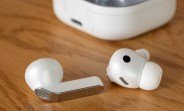
Samsung continues to expand its health-focused ecosystem, and the latest milestone is a significant one: the U.S. Food and Drug Administration (FDA) has granted clearance for the Hearing Aid feature on select Galaxy Buds models. This approval positions Samsung’s wireless earbuds as a legitimate over-the-counter (OTC) hearing solution for adults, offering a more accessible and affordable alternative to traditional hearing aids.
For millions of people who struggle with mild to moderate hearing loss, this development could be a game-changer. Instead of spending thousands of dollars on specialized devices, users can now leverage the technology they may already own. The feature is designed to assist in everyday situations, such as following conversations in bustling restaurants, understanding dialogue in noisy environments, or simply catching every word during a family gathering.
What the FDA Approval Means for Galaxy Buds Users
The FDA’s clearance is not just a regulatory checkbox; it validates the safety and effectiveness of the Hearing Aid feature. Under the OTC category, this feature is now accessible without a prescription or a medical exam, making it easier for individuals to take control of their hearing health. The approval applies to users aged 18 and above, covering a broad demographic of adults who may have been hesitant to seek professional help or invest in costly hearing aids.
This move aligns with a growing trend in consumer electronics where everyday devices are being repurposed for health-critical functions. Samsung has been steadily integrating advanced health monitoring into its wearables—from blood pressure tracking to sleep analysis—and now hearing support joins that lineup.
Who Can Benefit from the Hearing Aid Feature?
This feature is specifically tailored for individuals with mild to moderate hearing loss. According to the World Health Organization (WHO), hearing loss affects over 1.5 billion people globally, and this number is projected to rise. However, only a fraction of those who need hearing assistance actually use hearing aids, often due to cost, stigma, or lack of access. The Galaxy Buds’ Hearing Aid feature addresses these barriers by offering a discreet, stylish, and relatively affordable solution.
If you find yourself constantly asking others to repeat themselves, turning up the TV volume higher than usual, or struggling to hear in group settings, you might be part of the target audience. The feature is not intended for severe or profound hearing loss, but for those who need a boost in specific listening situations, it can be remarkably effective.
How the Hearing Aid Feature Works on Galaxy Buds
The Hearing Aid feature is not a simple volume amplifier; it uses sophisticated algorithms to process sound in real-time. The earbuds capture ambient audio through their built-in microphones, then apply frequency-specific amplification based on the user’s hearing profile. This personalized approach ensures that soft sounds are made audible without causing discomfort from loud noises.
To use the feature, you’ll need to set up a hearing profile through the Samsung Health app. The app guides you through a series of hearing tests, which are designed to be user-friendly and can be completed in just a few minutes. Once your profile is established, the earbuds automatically adjust their output to match your specific hearing needs.
Compatible Galaxy Buds Models
Not all Galaxy Buds are created equal. The Hearing Aid feature is available on select models, including the Galaxy Buds2 Pro, Galaxy Buds Pro, and the latest Galaxy Buds2. Samsung has also indicated that future firmware updates may bring this functionality to other devices, but as of now, these are the primary models that support it.
If you own one of these earbuds, you’ll need to ensure they are running the latest firmware. The feature is activated through a software update, so checking for updates in the Samsung Wearable app is the first step. Once updated, you’ll find the Hearing Aid option in the accessibility settings or directly within the Samsung Health app.
Comparing Galaxy Buds to Traditional Hearing Aids
Traditional hearing aids have long been the gold standard for treating hearing loss, but they come with significant drawbacks. The average cost of a pair of prescription hearing aids can range from $2,000 to $7,000, and that’s before considering the cost of audiologist visits and follow-up adjustments. In contrast, Galaxy Buds are available for a fraction of that price, making them an attractive entry point for many.
However, it’s important to note the differences in performance. Prescription hearing aids are custom-fitted to the user’s ear canal and are programmed by audiologists to address specific hearing loss patterns. They also have longer battery life and are designed to be worn all day. Galaxy Buds, on the other hand, are general-purpose earbuds that offer hearing assistance as an additional feature. They may not provide the same level of amplification or comfort for extended wear, but for many users, they are more than sufficient.
Pros and Cons of Using Galaxy Buds as a Hearing Aid
Pros:
- Cost-effective compared to traditional hearing aids
- No prescription or medical exam required
- Seamless integration with Samsung smartphones and health apps
- Stylish design that doesn’t look like a medical device
- Can be used for music, calls, and other audio, making them a multi-purpose gadget
Cons:
- Not suitable for severe or profound hearing loss
- Battery life is shorter than dedicated hearing aids
- Comfort may be an issue for all-day wear
- Requires a compatible Samsung device for full functionality
Setting Up the Hearing Aid Feature: A Step-by-Step Guide
Getting started with the Hearing Aid feature is straightforward, but it does require a bit of setup. Here’s a simple walkthrough:
Step 1: Update Your Galaxy Buds Firmware
First, ensure your Galaxy Buds are updated to the latest firmware. Open the Samsung Wearable app on your phone, navigate to the settings for your earbuds, and check for software updates. If an update is available, download and install it. This step is crucial because the Hearing Aid feature is only available on the latest firmware version.
Step 2: Access the Hearing Aid Feature
Once your earbuds are updated, you can find the Hearing Aid feature in two places: the Samsung Health app or the accessibility settings in the Galaxy Wearable app. The path may vary slightly depending on your device and software version, but generally, you’ll look for a section labeled ‘Hearing’ or ‘Accessibility’.
Step 3: Complete the Hearing Test
The app will prompt you to take a hearing test. This test involves listening to a series of tones and indicating whether you can hear them. It’s recommended to perform this test in a quiet environment to get accurate results. The entire process takes about five minutes and will generate a hearing profile that is stored on your phone and synced to your earbuds.
Step 4: Customize Your Settings
After the test, you can adjust the amplification levels to your preference. The feature offers different modes, such as ‘Ambient Sound’ and ‘Conversation Enhancement’, which optimize the audio for specific scenarios. You can also toggle the feature on and off from the quick settings panel on your phone or directly from the earbuds’ touch controls.
Real-World Performance: What to Expect
In everyday use, the Hearing Aid feature performs admirably for its intended purpose. Users have reported noticeable improvements in their ability to hear conversations in noisy environments, which is one of the most common challenges for people with mild hearing loss. The earbuds’ microphones do a good job of picking up speech and reducing background noise, thanks to the built-in noise reduction algorithms.
However, it’s not a perfect replacement for a professional hearing aid. The sound quality, while clear, may not match the nuanced tuning of a prescription device. Additionally, the earbuds’ battery life, which is around 5-8 hours with the feature enabled, may not last a full day for some users. But for those who only need assistance in specific situations, such as during meetings or social events, the feature is more than adequate.
User Feedback and Early Impressions
Early adopters have praised the feature for its convenience and ease of use. Many appreciate that they can switch between hearing aid mode and normal listening mode without any hassle. The integration with Samsung Health is also a plus, as it allows users to track their hearing health over time and make adjustments as needed.
Some users have noted that the hearing test could be more comprehensive, but for a consumer device, it provides a reasonable baseline. The ability to manually fine-tune the amplification after the test helps compensate for any initial inaccuracies.
The Future of Hearing Health in Consumer Tech
Samsung’s move is part of a broader industry shift toward democratizing health care through consumer technology. Apple has already introduced similar features on its AirPods Pro, and other manufacturers are likely to follow suit. This trend is expected to grow as more people become aware of the importance of hearing health and as technology continues to advance.
The FDA’s approval of OTC hearing aids in 2022 paved the way for this kind of innovation, and Samsung is capitalizing on that regulatory change. By integrating hearing assistance into a widely-used consumer product, they are making it easier for people to address their hearing needs without the barriers of cost and stigma.
What This Means for Samsung’s Ecosystem
For Samsung, this feature strengthens the appeal of its Galaxy Buds and reinforces its commitment to health-focused technology. It also encourages brand loyalty, as users who rely on the Hearing Aid feature are more likely to stick with Samsung devices for their next purchase. The feature is a clear differentiator in a crowded market of true wireless earbuds.
Moreover, it opens up opportunities for Samsung to expand its health services. Future updates could include more advanced hearing assessments, integration with telehealth services, or even compatibility with other Samsung wearables like the Galaxy Watch. The possibilities are vast, and this approval is just the beginning.
Practical Tips for Maximizing the Hearing Aid Feature
To get the most out of this feature, consider the following tips:
- Take the hearing test in a quiet room to ensure accurate results.
- Experiment with different amplification levels to find what feels comfortable.
- Use the ‘Conversation Enhancement’ mode in noisy environments.
- Keep your earbuds clean and free of earwax to maintain microphone performance.
- Carry a charging case if you plan to use the feature for extended periods.
Also, remember that this feature is not a substitute for professional medical advice. If you suspect you have significant hearing loss, it’s always best to consult an audiologist. But for those with mild to moderate issues, the Galaxy Buds offer a practical and convenient first step.
Conclusion: A New Era of Accessible Hearing Support
The FDA’s approval of the Hearing Aid feature on Samsung Galaxy Buds marks a significant milestone in the convergence of consumer electronics and health care. It empowers individuals to take charge of their hearing health with a device they already own or can easily purchase, at a fraction of the cost of traditional hearing aids.
While it may not replace professional hearing aids for everyone, it fills a crucial gap for millions of people who need a little extra help in certain situations. As technology continues to evolve, we can expect even more innovative solutions that make health care more accessible, affordable, and integrated into our daily lives. Samsung’s latest feature is a testament to that future, and it’s exciting to see what comes next.

